Friday, August 29, 2014

Where to Find Computer Parts

Your computer repair shop in Mesa can help you with more than just repairs. Did you know that you can also get computer parts and accessories as well?
Get  the Right Computer Parts and Accessories in Mesa | 480-834-1318
Get the Right Computer Parts and Accessories in Mesa | 480-834-1318

The Right Computer Parts and Accessories

Some things are easy to find such as computer keyboards and computer mice. You can get USB flash drives often at a grocery store, but even with their availability elsewhere, you should really think about buying computer parts and accessories at your computer repair shop.
As to why, that's simple. A computer repair technician can ask you tech-related questions about your computer to make sure that you're getting the right parts and accessories. Questions like: What operating system are you using? How much hard disk space do you have? How much memory do you have? Why do these questions matter for a computer accessory or a part? Well, while some just require you to plug in to a USB port, some will require you to install some software. You can't really see your grocery store manager or sales clerk asking these sorts of questions or knowing where to guide you. It isn't really their job.

A Computer Repair Shop Will Have a Bigger Selection

The difference between a computer repair shop and a big box electronics store is that the bigger stores are all about moving products and driving sales. In some cases, salespeople that work there are commission only, and as such even though all you may need is some new computer speakers, if you're not careful, you can walk out with a bunch of stuff that isn't really necessary and will cost you more. In addition a big box electronics store has nothing vested in the community. While on a larger scale the company cares about their reputation, they're not going to have a vested interest in keeping people in the community happy.
A computer shop on the other hand has a lot more to gain or lose. We want satisfied customers because we know that one happy customer equals a dozen or more satisfied customers because they'll tell all their friends and family about their experience. We thrive on word of mouth as does any local business. In some cases, our customers are part of some very tight-knit communities such as gamers.

So we have everything to gain by giving you not only the right computer for your needs, but the right computer parts and accessories as well.
Softque Premier Computer Services
1155 S. Power Rd. 107
Mesa, AZ 85206
480-832-4600
Get Computer Parts in Mesa

Friday, August 22, 2014

More Reasons for Professional Tablet Screen Repair

There are several more reasons why you want to give serious thought to professional tablet screen repair.
Tablet Repair also includes repairs to your screen|  480-834-1318
Tablet Repair also includes repairs to your screen| 480-834-1318

Why Have a Professional Repair Your Tablet Screen ?

Our last article covered tablet screen repair as well. However, a lot of what we discussed doesn't cover what can go wrong with trying to do it yourself.  First off, you can't separate a tablet PC from its screen. Unlike a PC where if your monitor goes out and you just get another one, you don't have that option with a tablet or iPad screen. It's kind of like trying to replace the screen on a laptop only more so. After all, with a tablet PC or iPad, the screen is the computer.
In our last article, we covered reasons to get tablet screen repair done by a professional. Here are some additional reasons to consider. Let's say you followed every step perfectly. You turn on your iPad or tablet and absolutely nothing happens. And we do mean nothing. Your tablet doesn't power up. So you try it again. Again there's nothing. Can you determine what's wrong? Do you have the ability to know if you connected the wires right, or if you did, do you know if you disconnected something by accident? But let's say that you did connect everything correctly.
Even if you made the repair successfully, there’s no guarantee that the digitizer that you installed will work right and as a result, neither will your tablet. Sometimes, because of how sensitive a digitizer can be, your tablet or iPad can exhibit phantom touches. So you can be using it peacefully, and then the next moment, it will open something else up. When LCD technology works right, it is very easy to use. However, when it starts to go wrong, it can turn any time on your tablet into a stress headache really fast.

LCD Screen Repair is Not For Everyone

Even if you have a fairly cheap tablet, you don't want to have to replace it. As we covered in one of our earlier articles, unless you have some sort of cloud backup or image of your computer, you have a good chance of losing your files if you have to get a new tablet. So in other words, you'll have the tablet, just not the data.
We have seen it happen a lot. We get people that come in and tried to fix their tablets on their own, and lost all their contacts, their photos, and their files. By the time they were done with all the parts and tools their so-called easy and inexpensive screen repair turned into a big expense and a major hassle.
So remember, there are some things that are easy to fix. But when you get into something like tablet screen repair, then you're better off contacting a professional.
Softque Premier Computer Services
1155 S. Power Rd. 107
Mesa, AZ 85206
480-832-4600
http://softque.com/contact/

Friday, August 15, 2014

Tablet Screen Repair

Do you need to repair your tablet screen? Then you need to get it into a shop.
In a previous article, we covered getting a new laptop.  A cousin of the laptop is a tablet PC or iPad.
Call Today for Tablet Screen Repair in Mesa | 480-832-4600

When Should You Repair Your Tablet Screen?

When should you repair your tablet screen? Well, consider if you will. Even with an add-on keyboard, a tablet or iPad is largely dependent on it's touch screen technology. Without a functioning screen, your $300 tablet can easily become a very expensive clipboard, or tomorrow's charity donation or electronics recycling pickup. Something that you must know is that you want to get it into a repair center and not try to fix it yourself.
Why? Well for one thing, while you can buy the glass you need, not only are you going to need a whole bunch of tools that you may or may not have, it may not be just the screen that's damaged. You’ll need to get a replacement screen, with a digitizer attached to it. The digitizer is what translates your taps and gestures into input on the iPad. While all the tools, the glass and LCD aren't that expensive, there are a few problems that all the do it yourself guides don't cover.

Even an iPad Needs to Be Backed Up

For example, there are a few cables that run just around the edges of the front glass panels. If you don't connect them properly, or worse yet, if you damage them, not only will your screen not work, it will force you to have to go out and get even more parts. However, let's say for the sake of argument that you have read up on a few websites, and you now consider yourself to be an expert in how to repair a tablet screen.
Have you considered what would happen to all of your data if you don't do something right? You have a good chance of wiping all or part of it out. That's where a place that does tablet or iPad screen repair has a clear edge. They know all the steps to follow to help protect your data as well as replace your screen.
So remember, it isn't what you know that can cause you a big problem. It is what you don't know. And what you don't know about repairing a tablet screen could cost you your tablet.
For more information on tablet screen repair, be sure to read part two of this series.
Softque Premier Computer Services
1155 S. Power Rd. 107
Mesa, AZ 85206
480-832-4600
Get Tablet Screen Repair
Get Computer Virus Removal

Friday, August 8, 2014

Should You Buy a Remanufactured Computer?

Should you buy a remanufactured computer? Well, before you do, there are a few things that you should be aware of...
Buy a Reconditioned Computer in Mesa | 480-834-1318

Do Remanufactured Computers Have a Warranty?

In our last article, we covered getting a brand new laptop.  This article will focus on buying a reconditioned computer and why it may not be a bad idea for you to consider.  Ordinarily a remanufactured computer has gone through a full series of tests at the factory before being sent back out. Why would you want to buy a reconditioned computer? Well, for one, a substantial cost savings. Sometimes, you can get a top of the line computer for about a third of the price of buying it new or even lower. For a small business owner concerned about their bottom line, or a financially-strapped gamer, these savings can really add up.
Do remanufactured computers have a warranty? Ok, first off, some remanufactured computers do not have a warranty. That's a requirement. Only buy a remanufactured computer with a full warranty. That way the original issue that the computer was sent back for will be a covered part as well as any other issues as well. That way you can rest assured that your computer is a good purchase and not one you'll regret later.

Are Refurbished Computers Right For Everyone

A refurbished computer is not right for everyone. If you're all about flash, and showing off the newest tech, then you'll want to go new and not refurbished. Another thing that you must check carefully is what features come with your remanufactured computer. Does it have a keyboard, a mouse, and a monitor? If you want to use your own, are the connectors there and are they compatible. If your mouse is an older PS/2 type, it won't work if all you have is USB ports on the back. On the subject of USB ports, how many are there? Does your computer have all the cords too?  W

hen you're getting ready to buy, this is kind of like kicking the tires on the car. Make sure you ask some questions of the computer shop too. That way you're not getting just a reconditioned computer, you're getting the best computer ever.
Softque Premier Computer Services
62 N Stapley Dr.
Mesa, AZ 85203
480-834-1318
Buy a Refurbished Computer

Friday, August 1, 2014

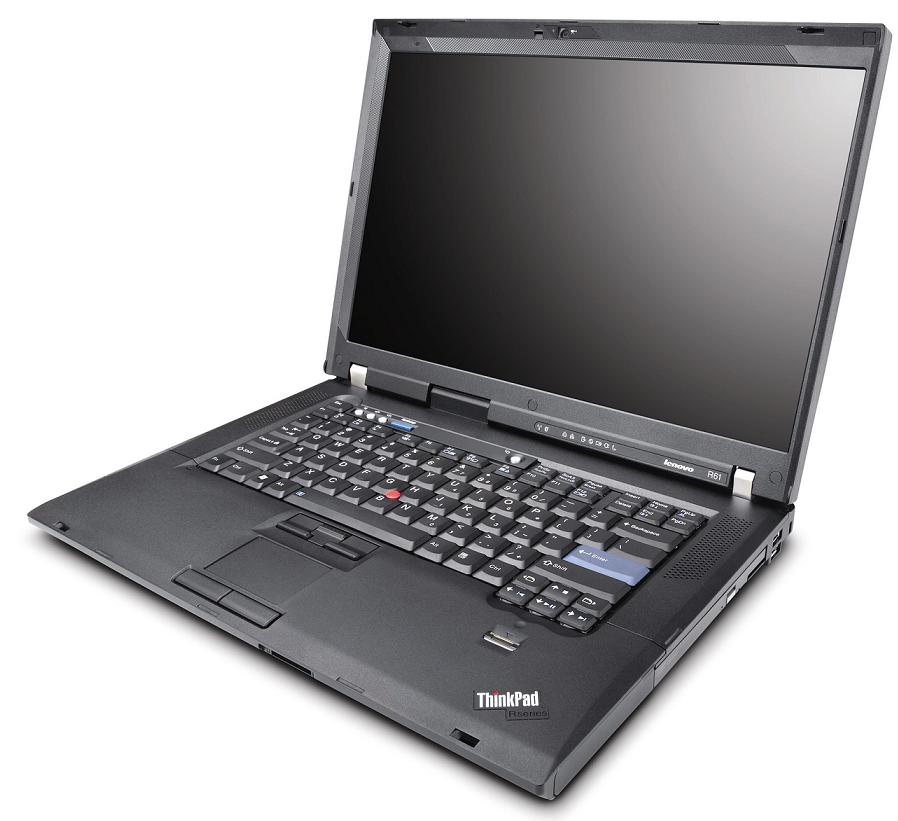
Buying a New Laptop: What You Should Know

If you want to buy a new laptop, there are several things you want to know before you reach for your wallet.
Buy a Laptop | 480-834-1318

What Are You Going to Use Your Laptop For?

What are you going to use your laptop for? A marketing executive is going to have different needs than a college student. How often are you going to be hauling it around and where? Knowing the answers to questions like this
helps you to get the right laptop. If you are mostly going to use a laptop for writing, you want three things: durability, a good keyboard, and a screen that is sharp and easy to read. Although some of the must have features on a laptop are shared, someone who is using a laptop for gaming is going to have much different needs, however.
Gaming is supposed to be fun. If you settle for a low-end laptop, however, pretty soon, you're going to give up gaming for another activity because you won't be able to stand the aggravation of slow graphics, slow speeds, and constantly losing the latest round online. That's why if you're a gamer, don't go cheap. Although we DO NOT recommend laptops for gaming (Because they get so hot), if you are set on a gaming laptop, buy a laptop with a high-end processor, top-of-the-line discrete graphics and a dual-core processor, a monitor with very high resolution and great speakers. If you don't know what to buy, Dell Alienware and ASUS are great brands and it is easy to get a custom specifications.

What Laptop's Best for a Graphic Designer

What laptop should you get if you're a graphic designer? Well, you are going to need a high end laptop, much like a gamer. However, in addition to the high-end processor, good graphics and video features, as well as a high-resolution monitor, you're going to need full HD or higher. All of these features work together. You'd need a fast processor to stop lag when you're editing images. For video you need to have the ability to play it real time without buffering.
Ideally, you don't just want to buy a laptop from the store. You want to make one that is a perfect fit. The best place to get this done is at a shop that sells custom-made laptops
Softque Premier Computer Services
62 N Stapley Dr.
Mesa, AZ 85203
480-834-1318
Buy a Laptop in Mesa